This was the most advanced coding project. We didn’t just install a plugin; we built one from scratch using PHP and connected it directly to a new table in the WordPress database. This custom plugin manages a “Student Database” and performs the four fundamental database operations, known by the acronym CRUD:
Create (Adding new students)
Read (Displaying the list of students)
Update (Editing a student’s information)
Delete (Removing a student from the list)
Mastering CRUD is essential for building any dynamic application, from social media to e-commerce.
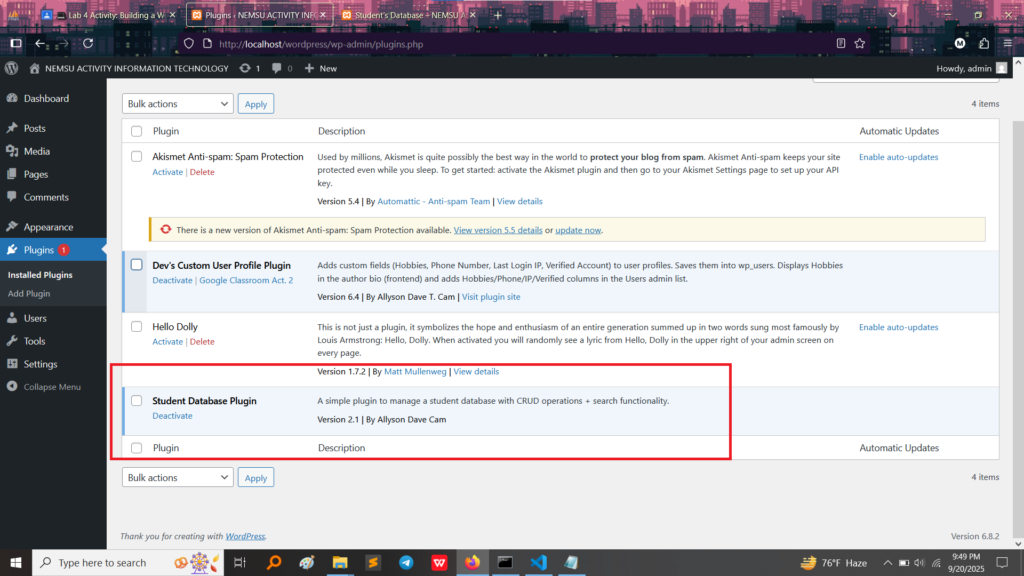
Plugin Activation (Backend Proof)
First, here is the proof that the custom-built plugin, named “Student Database Plugin,” was successfully installed and activated in the WordPress administrative area. This proves the code was correctly written and integrated into the CMS.
Demonstrating CRUD in Action (Frontend and Database)
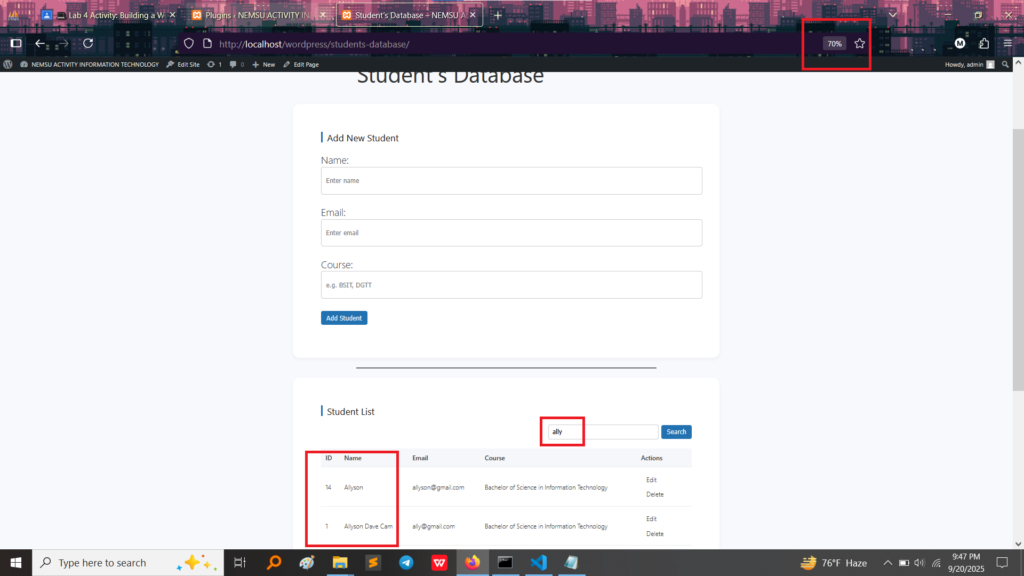
The following images demonstrate all four CRUD functions working together on the live website.
1. CREATE (Adding New Data)
The top half of the frontend page shows the “Add New Student” form.
Function: This is the CREATE function.
Proof: By filling out the “Name,” “Email,” and “Course” fields and clicking “Add Student,” the plugin takes this information and writes a brand new record into the database.
2. READ (Viewing the Data)
The bottom half of the frontend page shows the “Student List.”
Function: This is the READ function.
Proof: The plugin successfully pulled the stored data from the database table (e.g., student ID 1: Allyson Dave Cam) and displayed it neatly on the webpage. It also includes a Search function, which is a key part of reading/retrieving data efficiently.
3. UPDATE & DELETE (Modifying and Removing Data)
The actions column in the student list contains buttons for editing and deleting.
Function: This section demonstrates the UPDATE (Edit button) and DELETE (Delete button) functions.
Proof (Delete): Clicking Delete sends a command to the database to permanently remove that specific student’s record.
Proof (Update): Clicking Edit would load the student’s data into a form, allowing me to change the name or course before saving the changes back to the database.
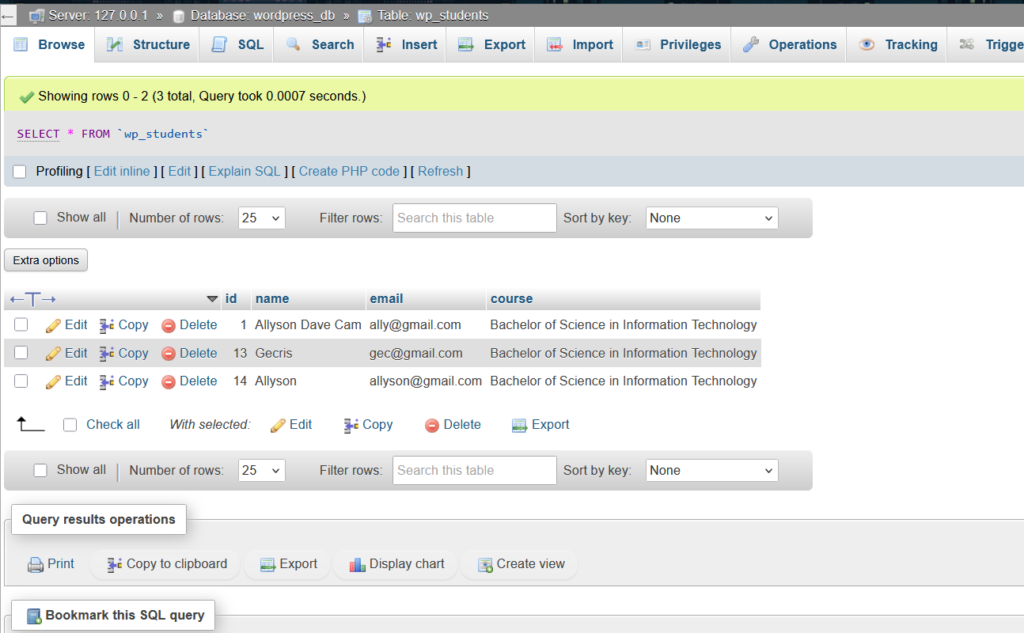
4. Database Verification (Proof of Storage)
This final screenshot shows the backend database (phpMyAdmin) directly, which is where the data is permanently stored.
Proof: You can clearly see the custom table, wp_students, containing the student records (ID 1, 13, and 14) that are being displayed on the frontend list. This is the ultimate proof that the CRUD plugin is fully functional, managing data directly in MySQL.
What I Took Away From This Activity
This project was the most challenging but also the most rewarding, as it showed me the core mechanics of all modern web applications:
Full-Stack Development: I learned how to handle all parts of a web application:
Frontend (HTML/CSS/JavaScript): Building the forms and the list view.
Backend (PHP): Writing the logic that handles form submissions and runs the CRUD commands.
Database (MySQL): Structuring the data table (wp_students) and interacting with it using SQL queries.
The CRUD Blueprint: I now understand that almost every web feature—posting a comment, adding a product to a cart, or updating a profile—uses the CRUD blueprint to manage data effectively.
Custom Database Tables: I gained experience creating and managing custom database tables (wp_students) rather than relying only on WordPress’s default tables, which is crucial for custom development.